






What IT Infrastructure Assessment Services Actually Deliver (And Why Most Audits Stall Before They Start)
IT infrastructure assessment services help organizations map, evaluate, and document their complete technology environment — hardware, software, networking, security controls, and IT asset management...


IT infrastructure assessment services help organizations map, evaluate, and document their complete technology environment — hardware, software, networking, security controls, and IT asset management — before costly decisions get made on incomplete information.
That’s the clean definition. Here’s what it actually means on the ground: someone finally builds an accurate picture of what you have, what it’s costing you, and whether the whole stack is quietly working against your business goals.
What Is an IT Infrastructure Assessment Service?
An IT infrastructure assessment service is a structured evaluation of an organization’s complete technology environment — covering hardware, networks, software, security, and IT asset management. It identifies gaps, inefficiencies, and risks, then produces a documented roadmap for remediation. The result is a defensible, prioritized picture of your IT estate. (52 words)
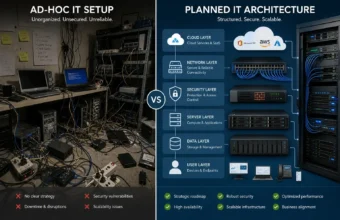
Most IT environments weren’t architected. They grew. A server added in 2018 for a project that ended in 2020. A SaaS tool adopted during remote work that nobody cancelled. A firewall that predates the current CTO. According to the Digital Enterprise Journal (2024), organizations waste an average of 35% of their cloud spend on idle or underutilized resources — and that figure only covers the cloud layer. On-premises sprawl typically looks worse.
An information technology infrastructure assessment answers the four questions leadership always asks before approving IT spend: What do we have? Is it secure? What is it actually costing us? And what do we fix first?
It’s not the same as a security penetration test or a vendor audit. Or maybe I should say it this way — it’s broader than either. It’s the foundational document that makes every downstream IT decision less of a guess and more of a plan.
What Does an IT Infrastructure Evaluation Actually Cover?
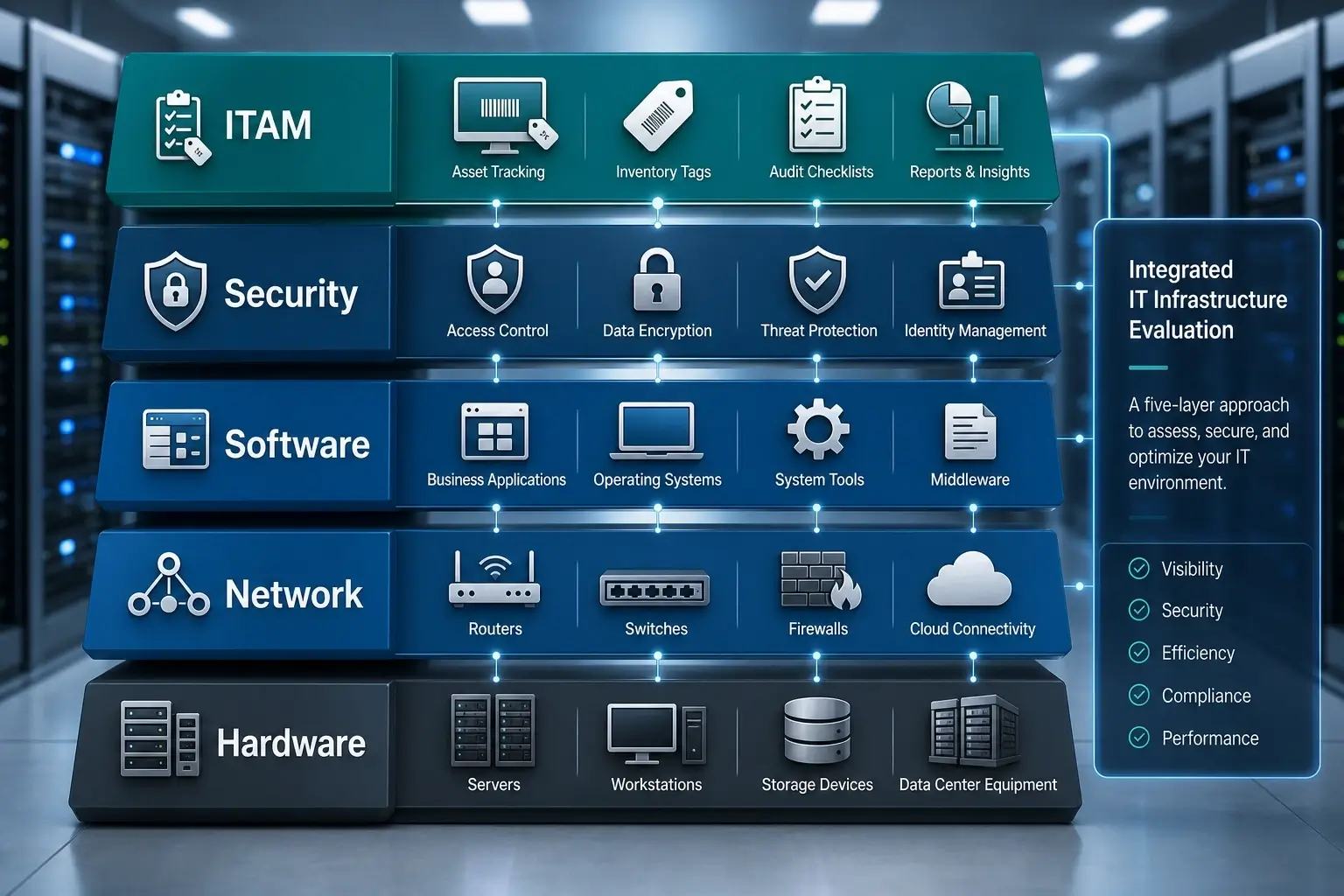
Here’s the thing: most organizations walk into an IT infrastructure evaluation assuming it’s basically a hardware inventory with a slide deck at the end. It isn’t. A real evaluation covers five distinct layers, and missing any one of them produces a report that is technically complete and operationally useless.
The five core layers of a complete IT infrastructure evaluation:
- Hardware and physical assets — servers (on-premises and co-located), workstations, networking equipment, storage arrays, and any end-of-life devices still carrying production workloads. Tools like Lansweeper automate discovery across the full network and surface assets that haven’t been manually catalogued in years — including the server in the back closet that “someone set up for a client demo” in 2019.
- Network architecture — topology mapping, switch and router configurations, bandwidth utilization baselines, firewall rules, and segmentation status. SolarWinds Network Performance Monitor is widely used here to establish real performance baselines rather than relying on documentation that may be eighteen months out of date and two topology changes behind.
- Software and licensing — installed applications, active SaaS subscriptions, license compliance status, and shadow IT. PDQ Inventory is particularly effective for Windows-heavy environments — it scans every domain-joined machine and returns a complete software manifest in under an hour, making it directly relevant to IT asset management (ITAM) evaluation workflows, including the kind used to evaluate an IT infrastructure company’s PDQ or ITAM posture.
- Security posture — access control policies, patch currency percentages, endpoint protection coverage, MFA adoption rates across privileged accounts, and known vulnerability exposure mapped to current CVEs.
- Cloud and hybrid integration — how on-premises systems connect to cloud environments, whether those connections are actively monitored, and whether cloud configurations match actual workload usage.
A counter-intuitive insight worth flagging here: most IT managers expect their biggest assessment findings to be hardware-related — aging servers, unsupported switches, that kind of thing. The data says otherwise. In the majority of professional assessments, the highest-cost findings involve misconfigured cloud resources, software license overspend, and access control gaps. The aging server is visible. The 200 dormant Microsoft 365 licenses are not.
Quick Comparison: IT Infrastructure Assessment Approaches
| Approach | Best For | Key Benefit | Limitation |
|---|---|---|---|
| Internal self-assessment | SMBs with an experienced IT team | Low cost, fast to initiate | Blind spots, no external benchmark |
| Third-party assessment service | Mid-to-enterprise orgs pre-migration | Objective, auditable, benchmarked | Higher cost, requires access provisioning |
| Automated discovery only (Lansweeper, PDQ) | Asset inventory as a standalone task | Fast, scalable, continuous | No human analysis or risk interpretation |
| Compliance-focused audit | Regulated industries (healthcare, finance, govt) | Maps directly to control frameworks | Narrow scope, misses operational gaps |
The IT Infrastructure Audit Checklist — Section by Section
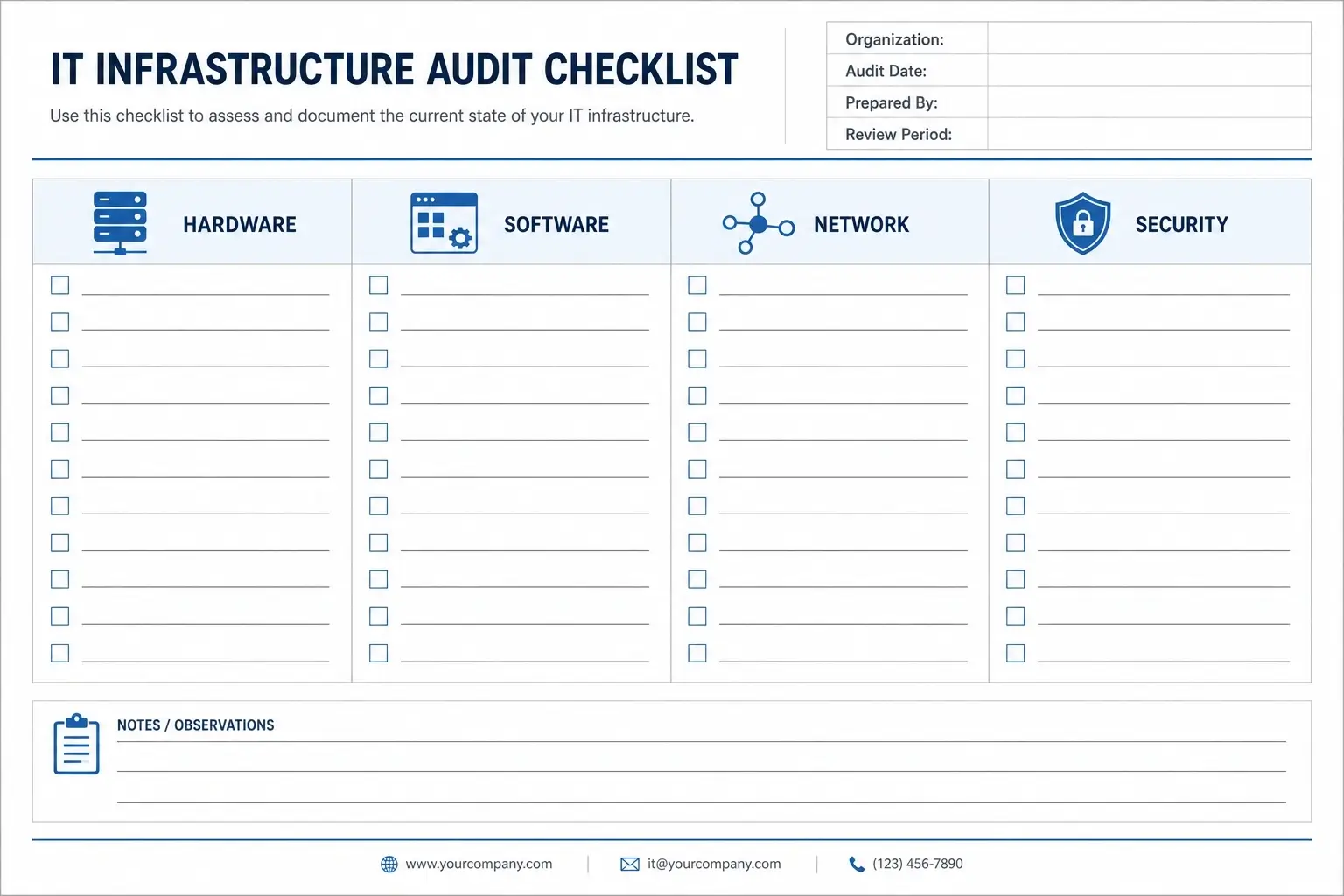
No competitor article gives you a practical, usable IT infrastructure audit checklist. They describe the process in general terms. Here is the actual working checklist, organized by domain.
How to conduct an IT infrastructure audit, follow these 7 steps:
- Define scope — list all sites, systems, and business units to include.
- Run automated discovery — deploy Lansweeper or PDQ Inventory across all endpoints.
- Map network topology — export current configs from all switches and firewalls.
- Inventory software and licenses — identify all installed apps and SaaS accounts.
- Review security controls — check patch levels, MFA status, firewall rules.
- Interview stakeholders — capture pain points not visible in tool output.
- Produce the assessment report — findings, risk ratings, prioritized roadmap.
(For a 200–500 user environment, each step typically takes 2–5 business days.)
Hardware Checklist
☐ Full server inventory: age, OS version, and manufacturer end-of-support dates
☐ Workstation inventory: RAM, storage, OS currency, and hardware warranty status
☐ Network equipment: switches, routers, wireless access points — firmware versions noted
☐ UPS and power redundancy coverage for critical systems
☐ Any hardware past manufacturer EOL still carrying production workloads — flagged separately
Software and Licensing Checklist
☐ All installed software mapped per device (PDQ Inventory for Windows fleets)
☐ Active SaaS subscriptions reconciled against actual user-level activity logs
☐ License compliance check: Microsoft 365, Adobe, VMware, and other volume agreements
☐ Shadow IT identified: applications installed without IT approval or procurement oversight
☐ Application version currency checked against current CVE exposure databases
Network Checklist
☐ Current network topology diagram (verified, not the one from 2022)
☐ Firewall rule audit — overly permissive or undocumented rules flagged
☐ VPN configuration and authentication method review
☐ Bandwidth utilization baselines across all physical and cloud-connected sites
☐ DNS, DHCP, and IP address management (IPAM) accuracy verified
Security Checklist
☐ Patch management currency: % of endpoints fully patched within 30 days
☐ MFA enrollment across all privileged, remote-access, and admin accounts
☐ EDR (Endpoint Detection and Response) coverage: % of managed endpoints covered
☐ Privileged access management (PAM) policy reviewed and enforced
☐ Incident response plan — last test date documented, last update date documented
IT Asset Management (ITAM) Checklist
☐ CMDB accuracy confirmed — does your configuration database reflect current reality?
☐ Asset lifecycle tracking: purchase date, warranty expiry, disposal records maintained
☐ PDQ Deploy/Inventory integration with ITSM platform verified (if applicable)
☐ Zombie assets identified: licensed software consuming spend on decommissioned machines
☐ Hardware refresh schedule documented with budget projections for next 24 months
Quick note: the ITAM section is consistently the most under-resourced area in infrastructure audits. Organizations using PDQ Inventory for ITAM discovery routinely surface 15–25% savings opportunities in software license consolidation alone — simply by reconciling what’s installed against what’s actively used.
Hiring an IT Infrastructure Assessment Service vs. Doing It Yourself

Some experts argue that internal IT teams are best positioned to assess their own infrastructure because they know the environment deeply. That’s a valid point for stable organizations with mature, documented IT operations. But if your documentation is sparse, your team is stretched thin, or leadership needs an objective and auditable deliverable to approve a major project — the internal approach creates more problems than it solves.
What a professional IT infrastructure assessment service delivers that an internal team genuinely cannot is benchmark context. A credible external assessor tells you not just what’s broken, but how your environment compares to similar organizations at your size, industry, and maturity stage. That context is what turns a findings list into a fundable business case.
Look — if you’re an IT director trying to justify a $400,000 infrastructure modernization project to a CFO who is skeptical, a third-party assessment report carries weight that an internal spreadsheet simply doesn’t. The objectivity is the product.
What professional IT infrastructure assessment services typically cost (2025 ranges):
- Small environments (50–200 users): $5,000–$15,000
- Mid-size (200–1,000 users): $15,000–$40,000
- Enterprise / multi-site: $40,000–$100,000+
I’ve seen conflicting data on ROI claims in this space — some vendors cite 30–40% infrastructure cost reductions following an assessment, while independent benchmarks suggest 15–25% is more realistic for mid-market organizations not undergoing a simultaneous cloud migration. My read is that the high-end figures tend to include cloud optimization wins that don’t apply to every environment.
Internal IT assessment vs. third-party IT infrastructure assessment service: Internal is better suited for stable, well-documented environments where the goal is operational improvement, because the team already has context and access. External services work better when leadership requires an objective, auditable deliverable for budget decisions, compliance preparation, or pre-migration planning. The key difference is credibility and benchmark data.
IT Infrastructure Documentation: What the Final Report Must Include
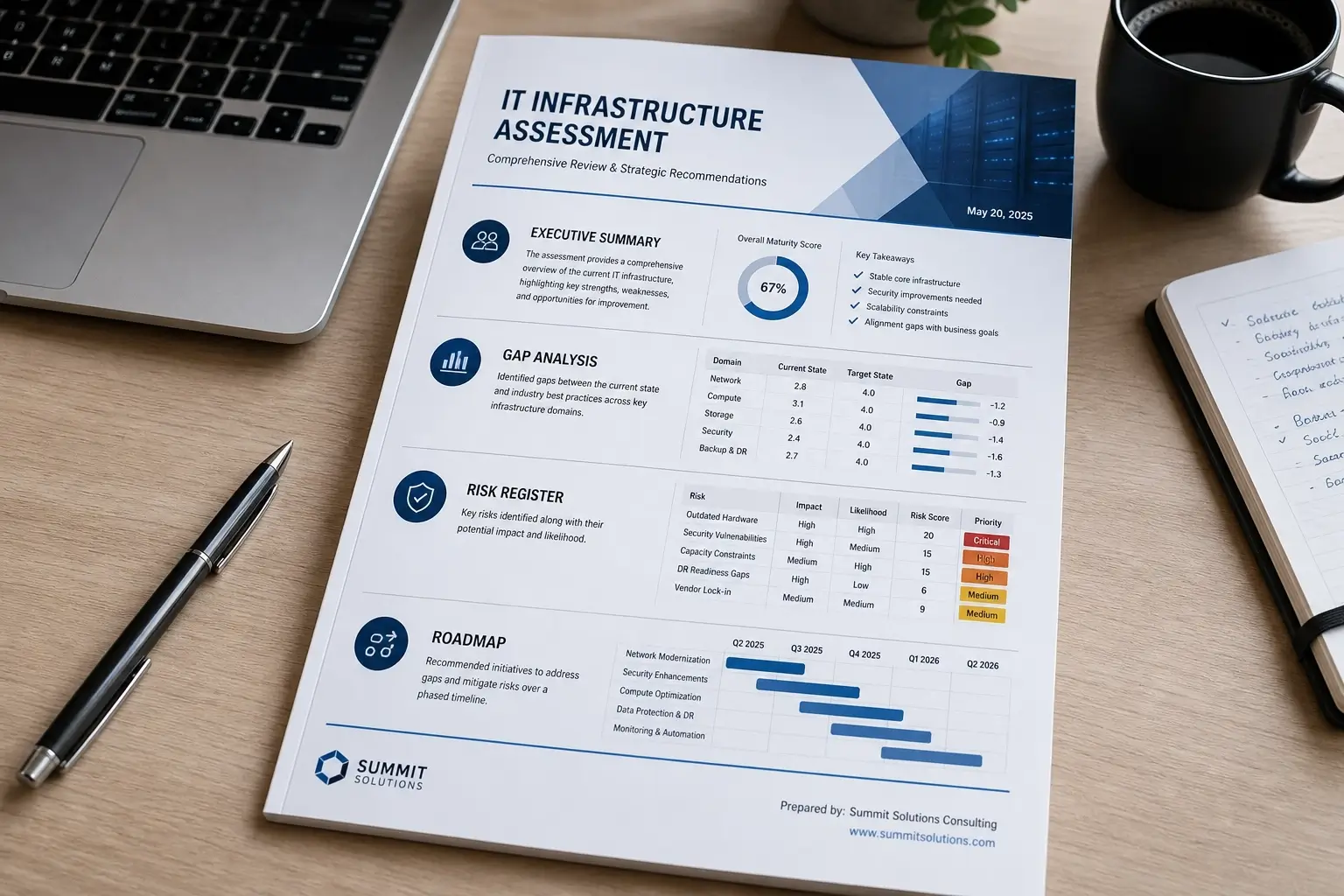
The assessment only creates value if the IT infrastructure documentation it produces is actually usable by people who weren’t in the room. A 200-page PDF that requires the vendor to decode it is not a deliverable. It’s a liability.
A high-quality IT infrastructure assessment report must contain six sections:
- Executive Summary — Risk rating, cost exposure estimate, and the top three recommended actions. Written for non-technical stakeholders. Under three pages. If the CFO can’t read it without a translator, rewrite it.
- Current State Inventory — Full asset lists, network topology maps, software manifests, and ITAM data. This is the evidence layer. Every finding in the report should trace back to something documented here.
- Gap Analysis — What exists versus what is required by your current business objectives, security standards, or applicable compliance frameworks. The gap, not the finding, is what drives prioritization.
- Risk Register — Each finding rated by likelihood and business impact. Critical items (unpatched CVEs on internet-facing systems, for example) separated from low-priority recommendations with clear remediation timelines.
- Prioritized Roadmap — Phased recommendations with effort estimates, cost ranges, dependencies, and responsible teams identified. Not a wish list. An actionable plan with a sequence logic.
- Appendices — Raw tool output: Lansweeper exports, SolarWinds performance reports, firewall rule sets, full software manifests. For technical staff and future auditors.
What most guides skip is the distinction between an assessment report that documents findings and one that actually drives action. The difference is whether the roadmap section includes effort estimates and a business case — or just a list of things that technically should get fixed someday.
Industry-Specific and Regional Assessment Considerations
Standard IT infrastructure assessment frameworks work well for most commercial organizations. They require meaningful adaptation for two contexts that virtually no competitor article addresses.
Government, Municipal, and Joint-Use Infrastructure
Organizations managing physical infrastructure — utilities, transportation networks, public facilities — often need to overlay a joint use infrastructure audit onto their IT assessment. This involves GIS-based mapping of shared physical assets (poles, conduits, fiber routes) combined with the IT systems that manage those records. Providers handling these engagements integrate platforms like Esri ArcGIS with traditional IT discovery tooling to produce a unified asset picture that satisfies both IT governance and physical asset management requirements.
The Manitoba Environment, Climate Change, and Infrastructure Criticality Assessment framework is a practical example — it requires infrastructure owners to evaluate not just the technical state of IT systems, but their criticality to essential public services, accounting for environmental dependencies and cascading failure risk. That scope is fundamentally different from a standard commercial IT audit.
Regional Market Context: Infrastructure Assessment in Fort Lauderdale and South Florida
Regional IT infrastructure assessment providers serving markets like Fort Lauderdale operate under a distinct compliance layer: Florida’s Information Protection Act (FIPA), sector-specific data security requirements for healthcare and financial services, and, for coastal infrastructure, increasing resilience requirements tied to climate and disaster preparedness. A regional provider with local regulatory familiarity adds contextual value that a nationally templated engagement won’t deliver.
Anyway — the point is that “IT infrastructure assessment services” covers a wider range of environments than any single checklist can fully address. Verify that any vendor you shortlist has direct experience in your industry and geography, not just the generic five-layer framework.
FAQs
What’s the best way to start an IT infrastructure assessment when there’s almost no existing documentation?
Start with automated discovery. Deploy Lansweeper or PDQ Inventory to generate a current asset baseline from what’s live on the network. Don’t wait for documentation to exist — treat the tool output as your ground truth and build from there.
How do I know whether to hire an IT infrastructure assessment service or run the evaluation internally?
If you need an objective, auditable deliverable for board or leadership approval — hire externally. If it’s for internal planning with an experienced team already in place and solid documentation, internal with the right tooling is a reasonable starting point.
Should I run a separate security audit, or is security covered in an IT infrastructure evaluation?
A full IT infrastructure evaluation should include a security assessment layer. Run a dedicated penetration test separately only when compliance requires it, or when you have a specific reason to suspect an active threat or compromise that needs forensic-level investigation.
Why does IT infrastructure documentation become outdated so fast?
Because most organizations document a point-in-time snapshot, not a continuously updated system. Without automated discovery tools running on a scheduled basis, documentation drifts within weeks of any infrastructure change — and changes happen constantly.
When is the right time to schedule an IT infrastructure assessment?
Before a cloud migration. Before a major hardware refresh cycle. Before a compliance audit. Before any merger or acquisition due diligence. Waiting until something breaks is the most expensive timing available.


No Comment! Be the first one.