






Build Your Business IT Infrastructure Right: A Practical Planning and Setup Guide
What IT Infrastructure Planning and Design Services Actually Cover IT infrastructure planning and design services refer to the professional process of assessing, designing, and implementing the...

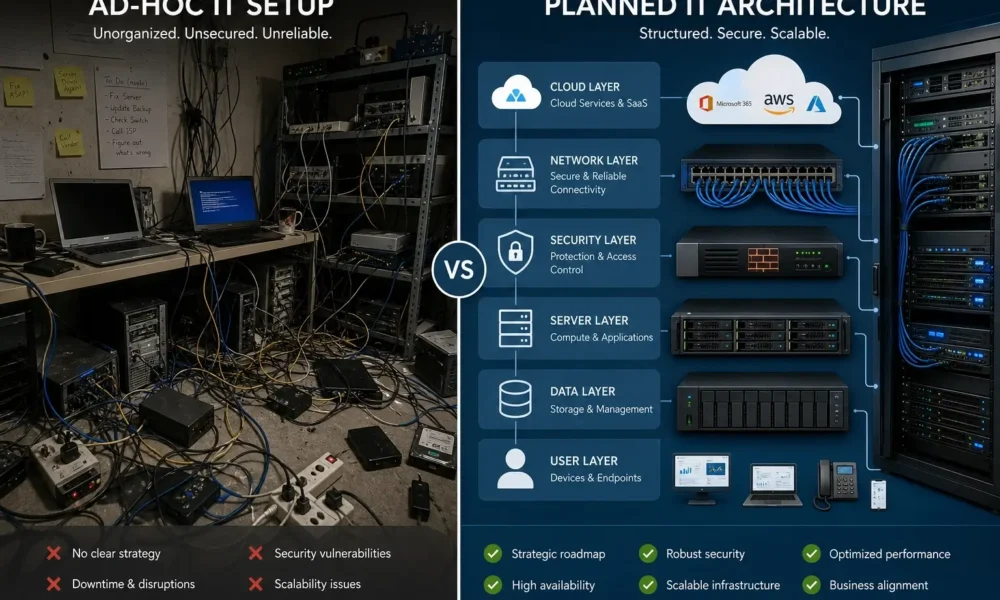
What IT Infrastructure Planning and Design Services Actually Cover
IT infrastructure planning and design services refer to the professional process of assessing, designing, and implementing the hardware, software, networking, security, and cloud systems a business needs to operate reliably at its current and projected scale. A qualified provider documents your requirements, produces a formal architecture, and deploys each layer in a tested sequence — before a single cable is run or server purchased.
That definition is clean. The business reality is messier.
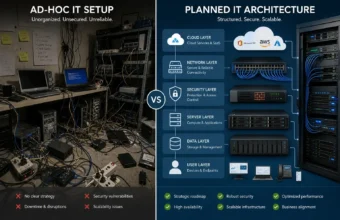
Most companies at the 10–75 employee mark don’t realize they need proper infrastructure planning until something forces the conversation — a new office lease, a headcount doubling, or a security incident that shuts down operations. By then, the cost to undo a patchwork setup is almost always higher than building it right from the start.
According to IBM’s Cost of a Data Breach Report 2023, the average cost of a data breach in the United States reached $9.48 million — more than double the global average — with inadequate infrastructure security cited as a leading contributing factor for small and mid-sized businesses. That’s not a hypothetical risk. That’s the documented cost of skipping the planning phase.
IT infrastructure planning and design services help businesses avoid that outcome by bringing architecture-first thinking to decisions that most small businesses make reactively — or don’t make at all.
The Core Components: What a Real Business IT Infrastructure Includes
Here’s the thing: most articles on this topic list components like a textbook index. Hardware. Software. Network. Cloud. Security. They skip the part that actually matters — how those layers interact, and why deployment sequence determines whether your infrastructure works under real-world load.
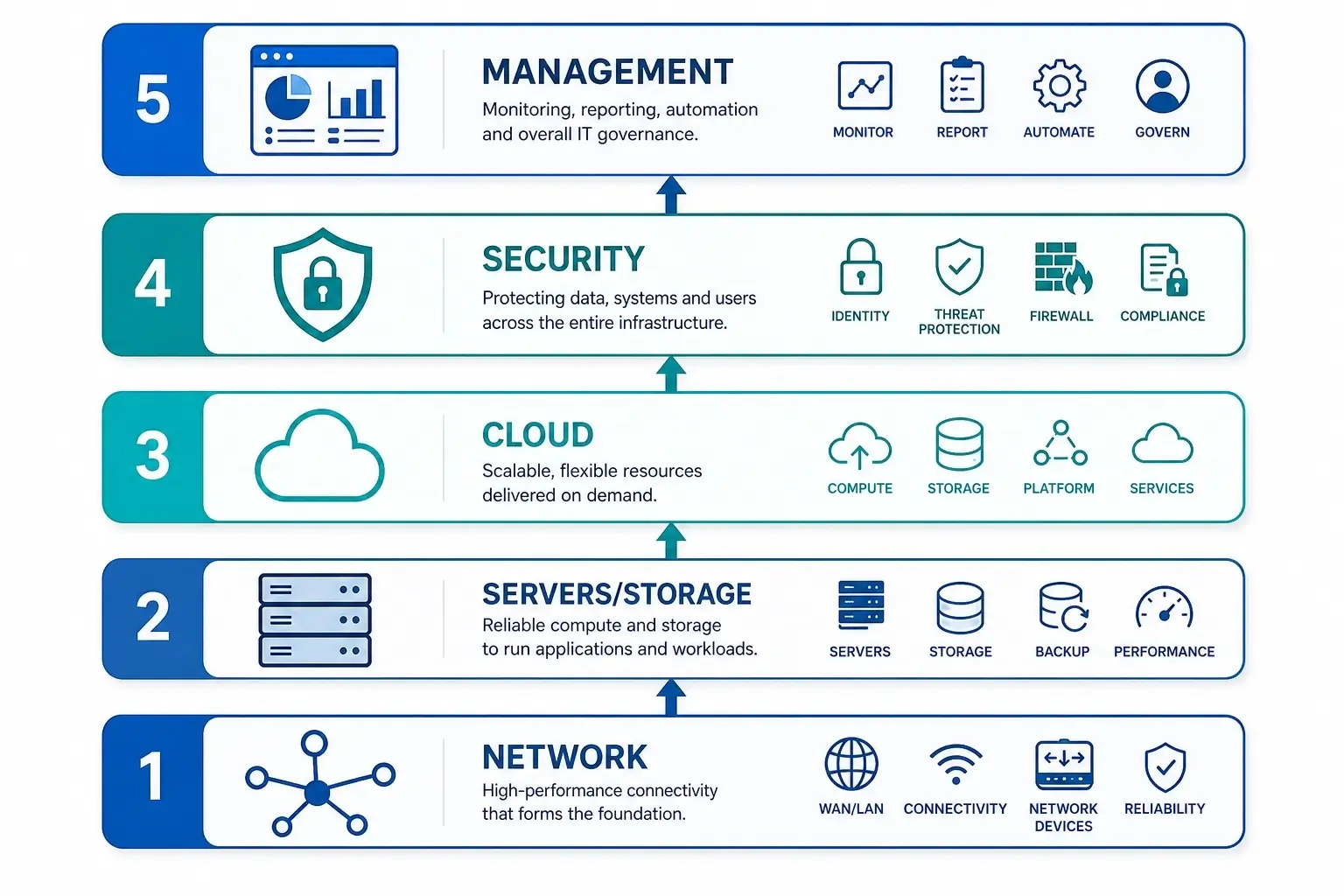
A properly designed small business IT infrastructure has five distinct layers. Each layer depends on the one below it. Getting the order wrong is how you end up with cloud services that don’t authenticate properly, or a security stack installed on a network that can’t support its bandwidth requirements.
Layer 1: Network Foundation (Build This First — Nothing Else Works Without It)
Your network is the circulatory system. Everything else depends on it being stable, segmented, and manageable.
A business-grade network for 20–50 users typically includes a managed firewall/router, managed switches for wired endpoints, enterprise-grade wireless access points, and VLAN segmentation to isolate sensitive traffic from general use. Cisco Meraki MX is the standard recommendation for multi-site SMB deployments — it’s cloud-managed through a single dashboard, which matters significantly if you don’t have on-site IT staff at every location. Ubiquiti UniFi is a credible lower-cost alternative for single-location setups with a technically capable administrator.
Separate SSIDs for staff and guests — this isn’t optional.
Businesses that skip VLAN segmentation often discover the problem during a security audit, not a planning review. Retrofitting it around live operations is genuinely painful. The time to do it is during the initial build.
Quick note: a wired and wireless office network for 20 users typically runs $3,000–$8,000 in hardware, plus professional installation. That range shifts significantly based on building layout and whether structured CAT6 cabling already exists in the space.
Layer 2: Servers, Storage, and Endpoints
This is where the cloud vs. on-premises decision gets made — or avoided, which is a decision in itself.
Dell Technologies PowerEdge servers are the benchmark hardware reference for SMB on-premises builds. A basic file and application server runs $2,500–$6,000. Fully provisioned workstations (Dell OptiPlex or equivalent) land at $800–$1,500 each depending on spec and whether you’re managing through a Mobile Device Management (MDM) platform from day one.
Or maybe I should say it this way: the hardware question and the cloud question aren’t actually separate. They’re the same question phrased differently. Deciding where your data lives, who manages uptime, and how you handle identity and authentication are all one architectural decision — and it needs to be made before any hardware is purchased.
Layer 3: Cloud Strategy
Most small businesses in 2026 don’t need to choose between cloud and on-premises. They need a hybrid model.
Microsoft Azure with Microsoft 365 Business Premium covers identity management (Entra ID), email, collaboration (Teams, SharePoint), device management (Intune), and cloud backup in a single per-user license at $22/user/month. That’s not a product pitch — it’s the architecture choice that eliminates the most redundant vendor contracts for a typical 10–75 person business.
On-premises vs. cloud infrastructure for SMBs: On-premises is better suited for businesses with regulatory data sovereignty requirements, consistent high-bandwidth local workloads, or industries like healthcare and legal where compliance mandates local data control, because it provides full architecture ownership with predictable long-term costs. Cloud works better for distributed teams, variable workloads, or businesses that need to minimize upfront capital expenditure. The key difference is who owns responsibility for uptime, patching, and disaster recovery.
Layer 4: Security (Designed In, Not Bolted On)
Most guides treat security as its own separate section — a checklist you run through after everything else is configured. That approach is exactly what produces the vulnerabilities IBM’s research documents.
According to the National Cybersecurity Alliance, small businesses are the target of 43% of all cyberattacks — not because they’re strategically valuable, but because they’re structurally vulnerable. Security controls need to be embedded in the infrastructure design, not added as afterthoughts.
A minimum viable security stack for an SMB includes endpoint detection and response (EDR) on all devices, multi-factor authentication across every cloud service (Microsoft Entra ID is the default for Microsoft 365 environments), DNS filtering — Cloudflare Gateway handles this at no cost and blocks malicious domains at the network level before they reach endpoints — and documented backup and disaster recovery with tested restore procedures.
The backup point is the one businesses consistently underestimate. Businesses with tested restore procedures recover from ransomware events in hours. Those without them can take weeks. Some don’t recover at all.
Layer 5: Documentation and Management Model
This layer isn’t hardware or software. It’s the decision about who owns ongoing IT operations — and it determines whether the infrastructure you build continues to work 18 months after deployment.
The options are in-house IT staff, a managed IT service provider (MSP), or a hybrid where an MSP handles monitoring and escalations while an internal coordinator manages day-to-day requests. For businesses under 50 employees, a qualified MSP is almost always more cost-effective than a full-time IT hire, which typically runs $55,000–$85,000/year in salary alone before benefits and overhead.
On-Premises, Cloud, or Hybrid: Choosing the Right Architecture for Your Business
Some experts argue managed IT services and cloud-first architectures only make sense above a certain headcount — usually cited as 20+ employees. That’s a reasonable position for purely reactive, break-fix support contracts. For businesses doing a planned infrastructure build from scratch, the design and project management value of a qualified provider applies well below that threshold — often at 10–15 employees.
The architectural decision itself comes down to three factors: your compliance requirements, your team’s physical distribution, and your appetite for managing vendors vs. managing hardware.
Quick Comparison
| Option | Best For | Key Benefit | Limitation |
|---|---|---|---|
| Full cloud (Microsoft 365 + Azure) | Distributed teams, mobile-first businesses, businesses without on-site IT | No on-site hardware to manage; scales immediately | Ongoing licensing cost; requires reliable high-speed internet |
| On-premises + cloud backup | Data-intensive local workflows, regulated industries (healthcare, legal, finance) | Full data control; consistent performance on local apps | Higher upfront CapEx; requires internal or contracted IT management |
| Hybrid (recommended for most SMBs) | 10–75 person businesses with mixed local and remote workflows | Balances control and flexibility; right-sizes cost | Requires careful architecture to avoid identity and security gaps |
| Managed service with MSP design | Any size business without dedicated IT staff | End-to-end accountability; vendor management included | Less direct control over change management pace |
I’ve seen conflicting data on the cloud vs. on-premises cost comparison — some analyses show cloud being cheaper over five years for SMBs, others show on-premises being significantly more cost-effective for businesses with stable headcount and high data volumes. My read is that the variable that changes the math most isn’t hardware cost or licensing cost. It’s the loaded cost of managing each option internally. Cloud wins the total-cost-of-ownership comparison for most businesses under 50 employees when you account for the time cost of maintaining physical infrastructure without dedicated IT staff.
How to Plan and Design IT Infrastructure for a Small Business
To plan and design IT infrastructure for a small business, follow these steps:
- Audit all current devices, accounts, applications, and network connections — document everything active.
- Define requirements: headcount projections, office locations, compliance obligations, and critical applications.
- Select your cloud strategy (full cloud, hybrid, or on-premises) before purchasing any hardware.
- Design the network topology and produce a bill of materials with named hardware models and licensing.
- Layer in security controls — EDR, MFA, DNS filtering, and backup — from the initial design, not post-deployment.
- Deploy in sequence: network infrastructure first, then servers and cloud services, then endpoints.
- Test and validate every system before go-live, and document the final architecture with named owners.
Each step has real decision points that affect cost and project timeline. Here’s how each phase actually runs.
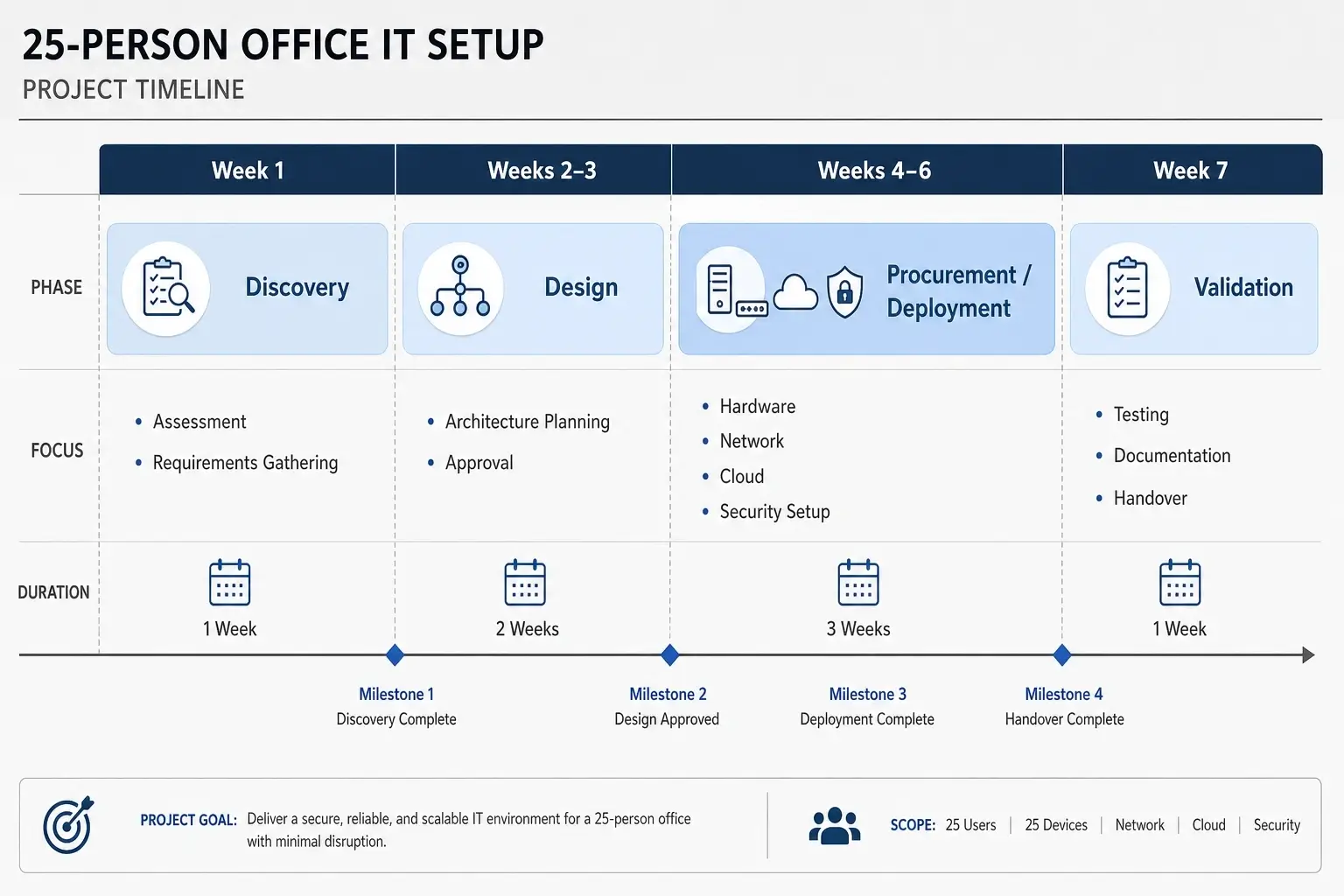
Phase 1 — Discovery and Requirements (Weeks 1–2)
This is the phase most businesses skip, and the omission is why projects go over budget. A discovery phase should produce a written requirements document — not a conversation, a document. It needs to capture headcount, location count, compliance requirements, existing licenses and contracts, critical applications, and business continuity expectations.
Anyone quoting you without first completing a documented discovery phase is offering installation services, not infrastructure design.
Phase 2 — Design (Weeks 2–3)
This is where a qualified IT infrastructure design consultant earns their fee. The design phase produces network topology diagrams, hardware specifications, licensing requirements, cloud architecture documentation, and a phased bill of materials. If a vendor provides a proposal without these deliverables, you’re looking at a hardware reseller, not an infrastructure partner.
Phase 3 — Procurement and Deployment (Weeks 3–6)
Lead times on managed hardware — Cisco Meraki in particular — can run 3–6 weeks depending on model and region. Singapore-based businesses sourcing through local distributors should add 2–4 weeks to this estimate. Factor procurement lead times into your office move or go-live timeline. Nothing derails an office setup faster than a core switch that’s still in transit on day one.
Phase 4 — Validation and Documentation (Weeks 6–8)
Look, if you’re going through a full infrastructure build and leaving documentation for “after go-live,” here’s what actually happens: it doesn’t get done. Document as you deploy. The next IT contractor, the next MSP, or the next internal hire will spend two weeks reverse-engineering your setup if you don’t. That time costs real money.
Website Infrastructure — The Component Almost Every IT Plan Ignores
Walk through the top competitor articles on IT infrastructure planning. Notice the gap: website infrastructure gets no coverage. It’s treated as the marketing team’s problem, operationally separate from the IT plan.
That separation is increasingly wrong — and it’s one of the most expensive blind spots in SMB infrastructure planning.
Your website sits on an infrastructure stack that directly interacts with your business network, your DNS, your email authentication records, and your customer-facing security posture. For a small business, that stack has three layers that belong in the IT plan.
DNS and Domain Management
Your DNS provider controls how all internet-facing services resolve — your website, your email, your VoIP system, and your remote access tools. Cloudflare is the current standard recommendation: free authoritative DNS with DDoS protection built in, a global CDN layer that reduces website load time, a Web Application Firewall, and a zero-trust networking capability (Cloudflare Access) that many SMBs use as a lightweight alternative to a full VPN.
Using your domain registrar’s default DNS is a mistake that appears in nearly every SMB infrastructure audit. It isn’t just a performance issue — it’s a security exposure.
Hosting Architecture
Shared hosting is appropriate for a static informational website with minimal traffic and no sensitive data. The moment your site handles transactions, customer accounts, or any personally identifiable information, you need a managed environment with defined SLAs. AWS Lightsail, Azure App Service, and managed hosting providers like Kinsta (for WordPress) are the standard starting points at SMB scale. Each has a different cost and management profile — the right choice depends on your application stack and whether you have internal development resources.
Email Infrastructure and Authentication Records
SPF, DKIM, and DMARC records are IT decisions, not marketing decisions. They are DNS configurations that authenticate your email sending infrastructure and prevent domain spoofing. A misconfigured email setup is simultaneously a deliverability problem and a security exposure. It’s also the most consistently misconfigured element found in SMB infrastructure audits.
If your current IT setup has never been formally audited for email authentication records, start there. It takes 20 minutes to fix and protects your domain from being used in phishing attacks against your own customers.
IT Infrastructure Services Cost: What Small Businesses Actually Pay
Budget clarity is what every competitor article fails to provide. Here’s a realistic cost framework for a first proper IT infrastructure setup, broken down by component and business size.
Hardware and Setup Costs (One-Time)
| Infrastructure Component | 10–25 Users | 25–50 Users | Notes |
|---|---|---|---|
| Network hardware (firewall, switches, Wi-Fi) | $3,000–$8,000 | $7,000–$18,000 | Cisco Meraki pricing; Ubiquiti is 30–40% lower cost |
| Server hardware (if on-premises) | $2,500–$6,000 | $5,000–$14,000 | Dell PowerEdge range; skip if going full cloud |
| Structured cabling (CAT6, patch panels) | $2,000–$6,000 | $5,000–$14,000 | Varies heavily by building size and existing infrastructure |
| Endpoint imaging + MDM enrollment (per device) | $150–$400/device | $150–$400/device | Lower per unit at volume |
| Professional services (design + deploy) | $3,500–$9,000 | $8,000–$20,000 | Varies by region and project complexity |
Ongoing Monthly Costs (Per User)
| Service | Cost Range | Notes |
|---|---|---|
| Microsoft 365 Business Premium | $22/user/month | Includes Exchange, Teams, SharePoint, OneDrive, Intune, Defender |
| EDR + managed backup | $15–$30/user/month | Prices vary by vendor and backup retention requirements |
| Managed IT services (MSP) | $75–$150/user/month | Includes monitoring, helpdesk, patching, and vendor management |
Total cost of ownership for a fully managed, properly designed 25-person IT environment typically runs $180,000–$260,000 over three years, including hardware, licensing, and managed services. That sounds significant. It also compares favorably against the $9.48 million average cost of a US data breach — a risk that inadequate infrastructure directly amplifies.
Infrastructure IT Setup Considerations by Location: Singapore, Monterey, and Multi-Site Deployments
IT infrastructure planning is not purely a technical exercise. Physical location introduces legal, logistical, and vendor-availability variables that belong in the design phase.
Singapore
Businesses setting up IT infrastructure in Singapore operate under the Personal Data Protection Act (PDPA), which governs data storage, breach notification timelines, and cross-border data transfer requirements. Cloud providers with Singapore regions — AWS ap-southeast-1, Azure Southeast Asia — simplify compliance for most businesses. Hardware procurement through local Cisco and Dell distributors can run 2–4 weeks longer than North American timelines; factor this into your deployment schedule.
Monterey and California-Based Offices
California businesses are subject to CCPA data privacy requirements, which affect how customer data is stored, processed, and disclosed. This has direct implications for cloud region selection, data logging policies, and vendor data processing agreements. Any infrastructure design for a California-based business should include a CCPA-aware data classification review as part of the discovery phase.
Multi-Site Setups
Cisco Meraki’s cloud management advantage is most pronounced across multiple locations. A single dashboard manages firewall policy, switching, and Wi-Fi across every office — no per-site IT staff required for routine changes. The alternative is managing independent hardware at each location, which works but scales proportionally in management cost. For businesses operating across two or more sites, the licensing premium for Meraki over Ubiquiti is generally justified by the operational overhead it eliminates.
Common Mistakes That Derail Small Business IT Infrastructure Builds
What most guides skip is the failure mode analysis. Patterns that actually break projects:
- Using consumer-grade hardware in a business environment. Consumer routers — including popular prosumer options — lack central management, enterprise VLAN support, and the reliability profile required under business load. The cost gap between prosumer and business-grade hardware is smaller than most buyers expect. The operational cost of replacing failed consumer gear mid-deployment is not.
- Skipping structured cabling. Running CAT6 properly — labeled patch panels, clean cable management, documented runs — costs roughly 30–40% more than a messy DIY cable installation. It also reduces every future troubleshooting session by a measurable amount. Businesses that cut this cost during buildout consistently pay it back, with interest, during the first year of operations.
- Migrating to cloud storage without auditing available bandwidth. Moving file storage to SharePoint or OneDrive without a bandwidth capacity review is a recurring mistake. A 150 Mbps business internet connection sounds fast until 40 users are syncing 2TB of files simultaneously on day one. Run the math before the migration, not after.
- No documented disaster recovery plan with tested restores. Forty-three percent of companies that experience a major data loss event never reopen (University of Texas Business Continuity Study, cited widely in business continuity planning literature). A backup that has never been tested is not a backup. It’s a hypothesis that hasn’t been falsified yet.
- Treating the IT plan as a one-time document. Infrastructure requirements change as headcount grows, applications change, and compliance requirements evolve. A plan built for 20 users may not safely serve 45. Build quarterly review checkpoints into your management model from the start.
Voice Search Q&A
What’s the best IT infrastructure setup for a small business?
For most small businesses under 75 employees, a hybrid setup delivers the best balance — Microsoft 365 Business Premium for cloud identity and productivity, Cisco Meraki or Ubiquiti for network hardware, and a managed IT service provider handling design, deployment, and ongoing support. Full cloud works best for fully remote or rapidly scaling teams.
How do I start planning my company’s IT infrastructure?
Start with a documented audit of every current device, account, and internet-facing service. Define headcount projections, office locations, compliance requirements, and critical applications before selecting hardware or cloud services. Always design the architecture before you procure anything — that sequence is what separates infrastructure planning from reactive purchasing.
Should I use cloud or on-premises infrastructure for my small business?
Most small businesses benefit most from a hybrid approach — Microsoft 365 cloud for identity, email, and backup, combined with local networking hardware and optionally a NAS for shared file storage. Full cloud suits distributed teams and minimizes capital costs. On-premises makes more sense when data sovereignty, high-bandwidth local workloads, or strict compliance requirements are involved.
Why does professional IT infrastructure planning cost so much?
The design, project management, documentation, and validation phases carry real labor costs that hardware quotes don’t include. A provider quoting you hardware only isn’t offering infrastructure planning — they’re offering installation. Professional planning eliminates rework, prevents compliance gaps, and produces documentation that makes every future IT decision faster and less expensive.
When should I hire an IT infrastructure design consultant?
Hire a consultant when you’re opening a new office, scaling beyond 15 employees, moving to a second location, or replacing ad-hoc IT. If you’re making decisions that are expensive to undo — cabling, server procurement, cloud platform selection, compliance architecture — professional design pays for itself in avoided rework alone.
Is Professional IT Infrastructure Planning Worth the Cost?
The honest answer: for most small businesses handling customer data, operating across more than one location, or planning for meaningful growth in the next 24 months — yes.
A structured IT infrastructure build — documented architecture, phased deployment, embedded security controls, and a clear ongoing management model — typically costs $15,000–$45,000 to design and deploy for a 10–50 person business. An unplanned infrastructure failure, security breach, or forced cloud migration while under operational pressure can run multiples of that figure. The IBM data cited earlier makes the math explicit.
The businesses that regret investing in professional IT infrastructure planning are rare. The businesses that regret not doing it are a well-documented category.




No Comment! Be the first one.