






What IT Infrastructure Services Actually Cover: And How to Find the Right Local Provider
Your IT held together for years on a combination of luck, aging hardware, and one overworked person who was always “about to fix that.” Then one afternoon, it didn’t hold together....


Your IT held together for years on a combination of luck, aging hardware, and one overworked person who was always “about to fix that.” Then one afternoon, it didn’t hold together. You lost hours. Maybe a whole day. Customers noticed, employees sat idle, and you realized — clearly, for the first time — that you have no disaster recovery plan and nobody accountable for making sure that doesn’t happen again.
Now you’re searching. And you’re getting buried under landing pages that promise “scalable, end-to-end solutions” without once telling you what those words mean for a 40-person company in Austin or a growing logistics operation in Jacksonville.
Look, if you’re in that situation, here’s what actually works: compare providers on scope and accountability before you compare them on price. This article gives you the framework to do that.
What IT Infrastructure Services Actually Are (And What They’re Not)
IT infrastructure services refer to the full set of technical resources — hardware, software, networking, storage, and cloud systems — that a business needs to operate, along with the ongoing management, monitoring, and support that keeps those resources functioning. In short: everything that makes your technology work, maintained by people whose entire job is to keep it that way.
That definition sounds clean. Reality is messier.
A significant portion of businesses discover — too late — that the “IT support” company they hired handles only help desk tickets: password resets, printer jams, software installs. That’s break-fix support. It’s not infrastructure management. The difference matters enormously when a server crashes at 2 p.m. on a Thursday and nobody has a recovery procedure ready.
IT infrastructure services differ from general IT support in scope and ownership. Where IT support reacts to problems after they occur, infrastructure services include proactive monitoring, hardware lifecycle management, cloud environment maintenance, and disaster recovery planning. According to Market Growth Reports (2026), as of 2024 over 78% of enterprises worldwide rely on third-party IT infrastructure providers to manage core systems, networking, and cloud transitions — a figure that reflects how decisively the market has moved away from purely reactive IT models.
What most guides skip is the scope conversation. Before evaluating any provider, get a written answer to one question: “What specific infrastructure components does your contract cover, and which ones are explicitly excluded?” Any provider who hesitates on that question is telling you something important.

The Core Service Components — Breaking Down What’s Actually Included
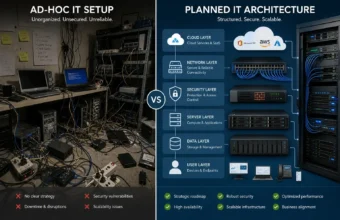
Not all IT infrastructure service packages look the same. Legitimate providers should be clear about which of the five core layers they own.
Hardware Infrastructure
Hardware infrastructure covers physical servers, workstations, network switches, routers, firewalls, and storage systems. Dell Technologies dominates this layer for most SMB deployments — their PowerEdge server line is a standard reference point for local IT consultants across US markets, with configurations that fit mid-size business budgets without requiring enterprise procurement processes.
Network Infrastructure
Network infrastructure is the backbone. Cisco Systems equipment appears in the vast majority of professionally managed business networks, from smaller offices in Glendale and Burbank to larger distributed operations in Miami and Jacksonville. If a prospective provider can’t specify the networking hardware they deploy and certify against, that’s worth pushing on.
Cloud Infrastructure
Cloud infrastructure is where confusion runs deepest. Microsoft Azure has become the default hybrid cloud platform for local managed service providers across US mid-size markets. Most local IT infrastructure consultants — whether you’re in Austin, North Chandler, or Pasadena — are building hybrid environments where some workloads stay on-premises and others run in Azure. That split requires ongoing active management, not just an initial setup.
Hardware and software infrastructure solutions are not interchangeable — they address different failure points. Hardware infrastructure determines physical capacity and network reliability; software infrastructure (operating systems, virtualization, middleware, management platforms) determines how efficiently that hardware is utilized and monitored. According to the IT infrastructure services market data from Straits Research (2025), the global IT infrastructure services market was worth $104.35 billion in 2024 and is growing at a 9.5% CAGR, driven primarily by hybrid cloud adoption and the demand for integrated hardware-software management rather than siloed point solutions.
Software Infrastructure
Software infrastructure covers operating systems, virtualization layers, middleware, and the management tools that sit above hardware. This is the layer most frequently underdiscussed in vendor conversations — and the layer where cost surprises tend to hide.
Security Infrastructure
Security infrastructure includes firewalls, endpoint protection, identity management, and continuous monitoring. It’s also the layer most likely to have partial coverage that nobody wants to clarify upfront.
Quick Comparison — IT Infrastructure Service Models
| Option | Best For | Key Benefit | Limitation |
|---|---|---|---|
| Fully Managed Infrastructure | SMBs with no dedicated internal IT staff | Complete provider accountability for uptime and response | Less day-to-day operational control |
| Co-Managed Infrastructure | Companies with 1–3 internal IT staff | Shared responsibility; lower total cost | Requires explicit written scope boundaries |
| Cloud-Only (e.g., Azure) | Remote-first or distributed teams | No hardware refresh cycles; instant scalability | Higher recurring cost; latency for some workloads |
| On-Premise + Hybrid | Healthcare, finance, regulated industries | Full data control; compliance alignment | High upfront hardware investment (Dell, Cisco) |
| Project-Based IT Consulting | One-time migrations or infrastructure builds | Defined scope; specialized expertise | No ongoing monitoring or support included |
Managed IT infrastructure services suit businesses without dedicated IT staff because a single provider takes accountability for uptime, monitoring, and incident response. Co-managed infrastructure works better when you already have internal IT and need to fill specific gaps. The key difference is accountability — managed means the provider owns outcomes; co-managed means accountability is shared and must be documented in writing before anything breaks.
Why Your City Actually Matters When Choosing a Provider
This is the part no competitor article bothers to explain. And it’s the part that trips up most business owners making their first serious infrastructure decision.
National IT infrastructure content treats location as irrelevant. It isn’t.
Austin and Central Texas
Austin and Central Texas is saturated with managed service providers targeting high-growth tech companies. That’s good if you’re scaling fast — more competition means better pricing and more providers fluent in rapid infrastructure buildouts. The risk: smaller, non-tech businesses in the Austin metro often get deprioritized by MSPs chasing larger contracts. Ask your prospective provider directly what percentage of their current clients are under 100 employees.
East Texas
East Texas presents a different constraint — provider density is thinner, which means longer on-site response windows and a heavier reliance on remote monitoring and management tools. If you’re in the East Texas corridor, weight remote infrastructure management capability more heavily in your evaluation than a business in Houston or Dallas would need to.
Jacksonville, FL and Miami, FL
Jacksonville, FL and Miami, FL both have strong and growing MSP ecosystems. Miami’s market skews toward businesses with international operations — relevant if you need IT infrastructure connecting US operations to international offices, including Singapore-based entities where data sovereignty and latency requirements add complexity. Jacksonville’s market tends to serve mid-size regional businesses and healthcare-adjacent organizations; providers there tend to have stronger familiarity with HIPAA-aligned infrastructure requirements.
Glendale, Pasadena, and Burbank
Glendale, Pasadena, and Burbank share an LA metro provider ecosystem but serve very different verticals. Burbank’s IT infrastructure market is heavily shaped by media and entertainment production — providers there often have deep expertise in high-throughput storage and content delivery pipelines. That specialized expertise may or may not translate to what your business actually needs. Ask specifically whether their team has served businesses in your industry.
North Chandler, Arizona
North Chandler, Arizona is a fast-growing suburban market where the provider landscape is still maturing. Businesses here commonly find themselves choosing between large Phoenix-based enterprise MSPs and smaller local boutiques — and the capability gap between those two options is significant. The boutique may respond faster; the enterprise MSP may have more certified engineers.
Quick note: for any market, on-site response time should be contractually defined in minutes and hours — not just referenced as “prompt” or “same-day.” Get the actual SLA figure in writing.
Choosing IT infrastructure services in a specific city or region requires evaluating local provider density, industry specialization, and on-site response time, not just service tier pricing. A provider with deep experience in Austin’s tech-company market may not be the right fit for a healthcare business in Jacksonville or a media production company in Burbank, even if their service catalog looks identical on paper. Location determines which providers are realistically accountable for your infrastructure.

How to Evaluate Any IT Infrastructure Provider Before You Sign Anything
Most business owners skip this step. They get a quote, check the price, call one reference, and sign.
That’s how you end up six months into a contract where the SLA technically says “4-hour response time” — and the fine print defines “response” as a ticket acknowledgment, not an engineer actively working on the problem.
To properly vet an IT infrastructure provider, follow these steps:
- Request a written scope of covered infrastructure components — in plain language, not service tier names.
- Ask for their infrastructure testing methodology — how they validate your environment before and after any changes.
- Verify actual average response time from last quarter’s incident data, not just the contractual SLA figure.
- Confirm vendor certifications: Dell, Cisco, and Microsoft Azure credentials are baseline expectations for any serious provider.
- Get a direct answer on after-hours coverage — who responds, and what’s the escalation path at 11 p.m.?
- Ask explicitly: “What do you NOT cover?” — a provider who can’t answer this cleanly is a liability before you even sign.
Infrastructure testing services deserve a specific moment here, because almost no evaluation checklist covers this — and it’s one of the clearest ways to tell serious providers from the ones who are just selling monitoring dashboards.
When a provider builds or takes ownership of your IT infrastructure, they should run a structured validation process: load testing your network under realistic conditions, stress-testing failover procedures, verifying backup recovery integrity with an actual restore, and documenting baseline performance metrics. Ask any prospective provider: “Walk me through your infrastructure testing process when you onboard a new client.” If they can’t describe a specific, step-by-step methodology, that’s your answer.
I’ve seen conflicting data on how often SMBs verify their backup recovery before a failure event — some industry sources cite figures as low as 30% for businesses under 100 employees, while other studies suggest the number is higher among companies already paying for managed services. My read: for unregulated SMBs that haven’t specifically contracted for tested disaster recovery, actual verified recovery rates are far lower than assumed — and this gap is precisely where infrastructure disasters become existential business problems.
Or maybe I should say it this way: a provider’s testing process is a better predictor of their actual value than their certifications, their case studies, or the polish on their sales deck.
Managed IT Infrastructure vs. In-House: The Trade-Off Nobody Calculates Honestly
Some experts argue that building internal IT infrastructure capability gives businesses better long-term control and cost efficiency over time. That’s valid for organizations at 300+ employees with stable, predictable IT needs and an existing technical leadership structure.
But here’s an opinion you might push back on: for a 20–150 person business in a mid-size US market, hiring a full-time internal infrastructure engineer is almost certainly more expensive and less capable than a well-scoped managed services contract with a qualified local provider.
A senior infrastructure engineer in Austin currently commands $95,000–$120,000 in annual base salary. That covers one time zone, one set of expertise, and zero redundancy when they take vacation, get sick, or resign. A competent MSP brings a team, multiple vendor certifications, 24/7 monitoring infrastructure, and vendor relationships that get hardware replaced on accelerated timelines you can’t match independently. In North America, over 65% of SMBs have already outsourced at least one infrastructure management function to a third party (Market Growth Reports, 2026) — not because outsourcing is always better, but because the math at smaller company sizes rarely favors full internal ownership.
The real argument for keeping infrastructure in-house isn’t cost. It’s control and institutional knowledge. If your business requires deeply customized infrastructure decisions, or if you operate in a regulated environment where third-party system access creates meaningful compliance complexity, internal capability makes sense. Know why you’re making the choice — not just what you’re choosing.
FAQs
What’s the best type of IT infrastructure service for a small business with under 50 employees?
Fully managed infrastructure services from a local MSP. At under 50 employees, the cost of internal IT expertise doesn’t add up. A managed contract delivers monitoring, hardware management, cloud administration, and a response team for a predictable monthly fee — usually between $100–$175 per user per month for full coverage.
How do I know if my IT infrastructure needs to be replaced or just upgraded?
Ask a qualified provider for a formal infrastructure assessment — most reputable MSPs offer this at low or no cost. They’ll document hardware age, network performance gaps, security vulnerabilities, and cloud readiness. Don’t attempt to self-diagnose this from a checklist; the interdependencies between hardware, network, and software layers require a mapped view you can’t get from inspecting pieces in isolation.
Should I choose a national IT infrastructure provider or a local one?
Local providers are generally better for businesses that need on-site support, have regional compliance requirements, or are in markets like East Texas or North Chandler where response time is directly tied to physical proximity. National providers work better for distributed teams with no single office anchor, or for businesses whose primary infrastructure lives entirely in the cloud.
Why does IT infrastructure keep failing even after we’ve upgraded hardware?
Because upgrades typically address symptoms rather than root causes. Adding RAM to an overloaded server doesn’t fix poor network architecture. Replacing old switches doesn’t fix a software configuration that’s been wrong for three years. A qualified infrastructure consultant will map your full environment — hardware, software, network, and security layers — before recommending changes, not just quote replacement components.
When should a growing business move to cloud infrastructure instead of on-premise hardware?
When your hardware refresh cycle is approaching and your team is increasingly remote or distributed, cloud infrastructure — particularly a Microsoft Azure hybrid setup — often delivers better cost-per-outcome than another on-premise server investment. The realistic tipping point for most SMBs is when the all-in cost of hardware replacement exceeds 18 months of equivalent cloud services, factoring in management overhead and downtime risk.





No Comment! Be the first one.